Windows Server 2016 Administration
Windows Server 2016: Nano Server, Server Core, Active Directory, DNS, DHCP, Hyper-V, WDS, WSUS, NLB and more.
Así estudias: curso autodidacta
- Autodidacta y 100% en línea: contenido disponible 24/7.
- Avanzas a tu ritmo: la plataforma guarda tu progreso.
- Sin tutor ni clases en vivo: el curso está diseñado para estudiarse por tu cuenta.
- Te evalúas con actividades automáticas, sin entregas a un tutor.
Lo que serás capaz de hacer
Learn to manage Windows Server 2016 with more than 10 hours of content that every systems administrator and/or network administrator should know. Some experience with Windows Server operating systems would be beneficial, but not a requirement for attending this course. This course is also beneficial for those intend to take the Microsoft 70-740 certification exam, which is one of the required MCSA certification exams. Course topics include: Deploying Windows Server as a Nano Server OS that is a 500 MB OS Deploying a Windows Server Core OS for increased security Understanding how PowerShell can be used for many administrative tasks Managing Active Directory in a Windows Server enterprise Understanding Windows Server Group Policy processing and troubleshooting Administering Windows Server Group Policy settings and preferences Managing DNS on a Windows Server, including management of Active Directory Integrated, Primary, Secondary and Stub zones, Records, Scavenging and more. Manage Windows updates using WSUS Implementing and Managing DHCP on Windows Server, topics such as DHCP Failover, DHCP Split-Scope Windows Server folder quotas and file screens Deploy DFS Namespace and DFS Replication using Windows Server Managing Print Servers and deploying printers using Group Policy Preferences Learn to install and configure Windows Deployment Services Use Windows Server Hyper-V to create and manage virtual machines Understand Windows Server built-in monitoring tools Backup and Restore Windows Server using built-in tools Implementing Network Load Balancing (NLB) And more
- Install Windows Server 2016 as a Desktop Experience Server, Server Core and as a Nano Server
- Manage users and computers using Active DIrectory
- Configure computers using Group Policy
- Manage DNS
- Understand Powershell
- Create and manage Virtual Machines using Hyper-V
Temario
UNIDAD 1 - Course Overview · 4 leccionesUNIDAD 1 - Course Overview
UNIDAD 1 - Course Overview
- Course Outline
- IMPORTANT: Udemy Player Settings
- Playback Speed
- Wishlist
UNIDAD 2 - (Optional) Lab Setup · 1 leccionesUNIDAD 2 - (Optional) Lab Setup
UNIDAD 2 - (Optional) Lab Setup
- (Optional) How to launch a lab
UNIDAD 3 - Installing Windows Server 2016 · 2 leccionesUNIDAD 3 - Installing Windows Server 2016
UNIDAD 3 - Installing Windows Server 2016
- Installation
- Installation of Windows Server 2016
UNIDAD 4 - Administering Server 2016 · 1 leccionesUNIDAD 4 - Administering Server 2016
UNIDAD 4 - Administering Server 2016
- Server Manager
UNIDAD 5 - Windows Server Core Operating System · 4 leccionesUNIDAD 5 - Windows Server Core Operating System
UNIDAD 5 - Windows Server Core Operating System
- What is Server Core
- Installing Windows Server Core
- Post-Installation configuration of Server Core
- Server Core Quiz
UNIDAD 6 - Nano Server · 4 leccionesUNIDAD 6 - Nano Server
UNIDAD 6 - Nano Server
- Nano Server Update
- What is a Nano Server?
- Nano Server Installation
- Managing a Nano Server
UNIDAD 7 - PowerShell · 6 leccionesUNIDAD 7 - PowerShell
UNIDAD 7 - PowerShell
- Comparing the Windows Command Line to PowerShell (part 1)
- Comparing the Windows Command Line to PowerShell (part 2)
- Using Windows commands in PowerShell
- Using Out-GridView
- Using PowerShell ISE
- PowerShell Remoting
UNIDAD 8 - Active Directory · 6 leccionesUNIDAD 8 - Active Directory
UNIDAD 8 - Active Directory
- Installing Active Directory
- Promoting a Server to a Domain Controller
- Installing Active Directory using PowerShell
- Managing User Accounts
- Managing Computer Accounts
- Managing Groups
UNIDAD 9 - Group Policy on Windows Server 2016 · 7 leccionesUNIDAD 9 - Group Policy on Windows Server 2016
UNIDAD 9 - Group Policy on Windows Server 2016
- Configuration Management
- Group Policy Demo
- Group Policy Processing Order
- Managing Local Group Policy Settings
- Managing Site, Domain, and OU policies
- Altering Group Policy Processing Order
- Group Policy Filtering
UNIDAD 10 - DNS Server Management · 12 leccionesUNIDAD 10 - DNS Server Management
UNIDAD 10 - DNS Server Management
- DNS Installation Demo
- DNS Resolution Process
- Understanding DNS Client Cache
- DNS Cache and Root Hints
- Logon process
- DNS Records
- DNS Zone Types
- Configuring Forward Lookup Zones
- Configuring Reverse Lookup Zones
- DNS Forwarding
- Configuring DNS Forwarding
- DNS Scavenging
UNIDAD 11 - DHCP · 10 leccionesUNIDAD 11 - DHCP
UNIDAD 11 - DHCP
- DHCP Overview
- DHCP Installation
- DHCP Scope PPT
- DHCP Scope Demo
- DHCP Lease from client
- DHCP Leases and Reservations
- DHCP MAC Filtering
- DHCP PowerShell
- DHCP Failover
- DHCP Backup and Restore
UNIDAD 12 - Print Server Management · 4 leccionesUNIDAD 12 - Print Server Management
UNIDAD 12 - Print Server Management
- Installing the Print Server role
- Managing the Print Server
- Creating printer alerts
- Deploying printers using Group Policy
UNIDAD 13 - File Server managment · 5 leccionesUNIDAD 13 - File Server managment
UNIDAD 13 - File Server managment
- File Server installation
- Creating File Server Quotas
- Creating Quota Templates
- Creating File Screens
- Quiz 1
UNIDAD 14 - Data Deduplication · 6 leccionesUNIDAD 14 - Data Deduplication
UNIDAD 14 - Data Deduplication
- What is Data Deduplication
- What is new in Data Deduplication
- When Data Deduplicaiton shoud be configured
- Installing Data Deduplication
- Configuring Data Deduplication
- Using the DDPEval.exe Too
UNIDAD 15 - Windows Deployment Services (WDS) · 4 leccionesUNIDAD 15 - Windows Deployment Services (WDS)
UNIDAD 15 - Windows Deployment Services (WDS)
- WDS Installation
- WDS Initial Configuration
- Adding Images
- Additional Configuration Options
UNIDAD 16 - Hyper-V · 9 leccionesUNIDAD 16 - Hyper-V
UNIDAD 16 - Hyper-V
- Installing Hyper-V
- Virtual Switches
- Creating a Virtual Machine
- Manaing Virtual Machine Network Settings
- Virtual Machine Memory Settings
- Understanding types of Virtual Hard Drives
- Managing Virtual Hard Drives
- Manaing Automatic Start and Stop Settings
- Working with CheckPoints
UNIDAD 17 - Monitoring Tools · 6 leccionesUNIDAD 17 - Monitoring Tools
UNIDAD 17 - Monitoring Tools
- Task Manager
- Resource Monitor: CPU and Memory
- Resource Monitor: Disk
- Resource Monitor: Network
- Performance Monitor
- Event Viewer
UNIDAD 18 - Installing and Configuring WSUS · 6 leccionesUNIDAD 18 - Installing and Configuring WSUS
UNIDAD 18 - Installing and Configuring WSUS
- WSUS Lab setup
- The benefits of having a WSUS server
- Part 1: WSUS installation and cofiguration
- Part 2: WSUS installation and cofiguration
- WSUS management
- Group Policy settings for WSUS and Windows Updates
UNIDAD 19 - Backup and Restore · 4 leccionesUNIDAD 19 - Backup and Restore
UNIDAD 19 - Backup and Restore
- Installing the Windows Server Backup feature
- Running a Windows backup job
- Accessing a Windows Server backup
- Restoring a Windows Server backup
UNIDAD 20 - BONUS: Network Load Balancing · 9 leccionesUNIDAD 20 - BONUS: Network Load Balancing
UNIDAD 20 - BONUS: Network Load Balancing
- NLB lesson introduction
- Understanding Network Load Balancing
- How NLB works
- NLB Cluster layout
- Installing IIS for an NLB web cluster
- Installing the NLB feature
- Configuring an NLB cluster
- NLB function and requirements
- NLB distributed deployments
Certificado con validez SEP (opcional) por $900 MXN adicionales: lo emite la SEP, no solo una plataforma
Al demostrar la competencia recibes un certificado emitido por la Secretaría de Educación Pública a través del Gobierno del Estado de México: un documento oficial que puedes presentar con confianza ante cualquier empleador o institución.
Tu certificado con INEC
- Lo emite la Secretaría de Educación Pública (SEP), a través del Gobierno del Estado de México
- Documento oficial con folio verificable en línea
- Lo otorga la Universidad Tecnológica Fidel Velázquez
Otras plataformas en línea
- Constancia privada emitida por la misma plataforma
- Solo acredita horas cursadas o asistencia
- Sin respaldo de una autoridad educativa
Tu itinerario, de la inscripción al certificado
- 1
Inscripción con pago único
Pagas $2,800 MXN una sola vez y entras de inmediato al curso.
- 2
Estudias a tu ritmo
20 unidades con videos, lecturas y actividades, disponibles 24/7 durante 12 meses.
- 3
Cuestionarios por unidad
3 cuestionarios para comprobar lo aprendido.
- 4
Certificado
Certificado INEC al terminar; si quieres, validez SEP por $900 MXN adicionales.
Tu certificado al terminar (validez SEP opcional)
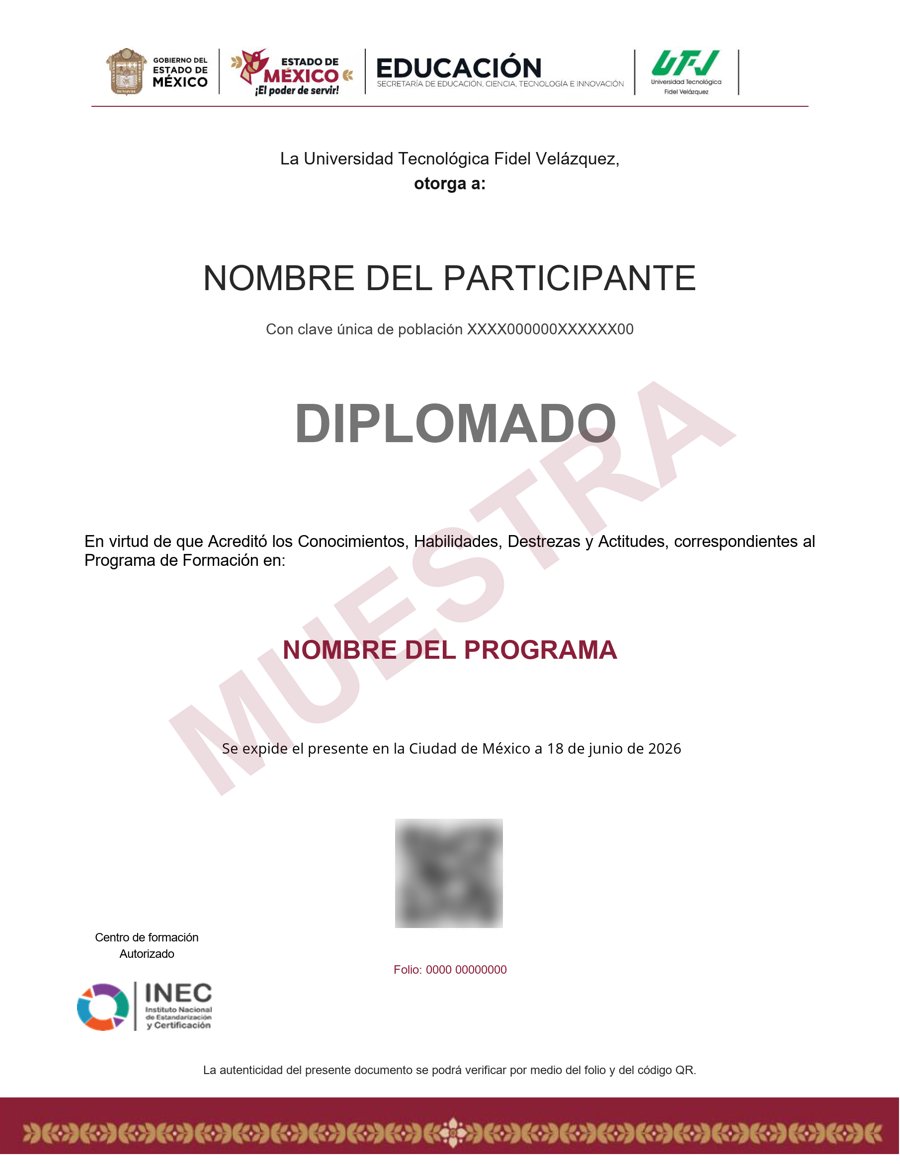
Muestra · verificable por folio y QR
- Opcional: por $900 MXN adicionales, certificado emitido por la Secretaría de Educación Pública (SEP), a través del Gobierno del Estado de México.
- Contenido impartido por Kevin Brown.
- Folio y QR verificables para compartirlo con quien te contrate.
Empieza hoy, a tu ritmo
Un solo pago y acceso inmediato al curso completo durante 12 meses.
- 20 unidades · 110 lecciones · 60 h
- 12 meses de acceso
- 3 cuestionarios de evaluación
- Validez SEP opcional por $900 MXN adicionales
Sobre tu inscripción
¿Cómo es el pago?
Un solo pago de $2,800 MXN. No hay mensualidades ni cargos recurrentes.
¿Cuánto tiempo tengo acceso?
12 meses desde tu inscripción, 24/7, para avanzar a tu ritmo.
¿Quién imparte el contenido?
El curso es impartido por Kevin Brown; INEC gestiona tu inscripción, evaluación y certificado.
¿Qué pasa cuando vence mi acceso?
Puedes renovar tu cuenta tú mismo desde la plataforma, sin trámites ni esperas.
¿El curso tiene validez SEP?
Es opcional: por $900 MXN adicionales obtienes un certificado emitido por la SEP a través del Gobierno del Estado de México, con folio verificable.
¿El curso tiene tutor o clases en vivo?
No. Es un curso autodidacta: estudias por tu cuenta, a tu ritmo, sin tutor ni sesiones en vivo.
¿Cómo se evalúa?
Te evalúas con actividades automáticas, sin entregas a un tutor.