
Windows Presentation Foundation Masterclass
Leverage WPF with C# and XAML to build real world skills with Azure, REST, MVVM and Machine Learning
Así estudias: curso autodidacta
- Autodidacta y 100% en línea: contenido disponible 24/7.
- Avanzas a tu ritmo: la plataforma guarda tu progreso.
- Sin tutor ni clases en vivo: el curso está diseñado para estudiarse por tu cuenta.
- Te evalúas con actividades automáticas, sin entregas a un tutor.
Lo que serás capaz de hacer
Do you know a little programming in C# or another language, but are struggling to get an interview, let alone a job? Maybe you are stuck in a low paying programming job, and want to move up to a better, more senior position. Perhaps you want to learn a new skill and expand your rèsumè. Or maybe you want to improve your .NET skills by learning a new and valuable framework. If one or more of these things describe you, then I'd suggest you give serious consideration to this course. This course will teach you how to create applications that have a rich user interface, using Microsoft's Windows Presentation Foundation (WPF). What is WPF ? WPF is part of the .NET framework and provides a consistent programming model for building applications by separating the user interface from business logic. It uses XAML (an XML based language) and C#. The runtime libraries are included with all versions of Microsoft Windows since Windows Vista. It's heavily supported by Microsoft and is a mature and powerful framework. Why should you bother to learn it? Many, perhaps most enterprise level .NET applications are built in WPF because of it's ability to create loosely coupled apps where the business logic and presentation layer are separated. This also applies to apps in general that are developed in .NET. A good portion of Winforms based projects are being upgraded to WPF as well. WPF developers are in high demand and WPF is fully supported by Microsoft in the latest versions of Visual studio and .NET. It's a key part of Microsoft's strategy moving forward. What will you learn in this course? WPF is developed using C# and XAML. You will learn how to use WPF to build and access powerful REST services (specifically weather information and machine learning in this course). You will also learn to create your own cloud services, and learn languages and patterns the open up future opportunities in Xamarin as well (iOS, Android and the Universal Windows Platform (UWP). In addition, in this course you will learn C#, XAML, the MVVM (Model-View-ViewModel) architectural pattern, Azure App and Storage services, and SQLite and more. Why enrolling in this course is the best decision you can make. Other courses focus on isolated examples on what you can do with WPF. Not this course! This course guides you through the creation of real world applications as you learn more and more about WPF. You will: Build a calculator as you learn: C# XAML Styles Build a contacts app as you learn: SQLite Using ListViews Creating Custom Controls Build a machine learning classifier as you learn: REST services Picking images from the computer Build a weather app as you learn: The MVVM architectural pattern More REST Build a notes app as you learn: More WPF controls such as toolbar, speech to text, toggle buttons, comboboxes, context menus and rich text format editors To add Azure App Services for cloud hosted databases To add Azure Storage Account services for storing files in the cloud To add Animations Your instructor, Eduardo Rosas, is a certified Xamarin Mobile Developer who has been building apps with C# and XAML since 2012. This means you are learning from someone who has all the professional training, skills, and experience you need to teach you how to become proficient with WPF in the fastest possible way. But all the while being taught the right way to program. If you are ready to get that first paid programming job, or to move up to a more senior programming position, then this course is for you! After completing this course, you will have the necessary skills to be able to use create your own WPF desktop apps giving you increase career opportunities. The sooner you sign up for this course, the sooner you will have the skills and knowledge you need to increase your job or consulting opportunities. Your new job or consulting opportunity awaits! Why not get started today? Click the Signup button to sign up for the course!
- Be able to build desktop apps that leverage WPF
- Be able to create your own cloud services
- Learn languages and patterns that open up opportunities to create iOS, Android and UWP applications using Xamarin
- Learn to better structure your code for easier maintenance, better code reuse, and greater compatibility with other projects (such as Xamarin and UWP)
- Build your own app from start to finish including its cloud services such as databases and file storage
Temario
UNIDAD 1 - Intro to WPF · 6 leccionesUNIDAD 1 - Intro to WPF
UNIDAD 1 - Intro to WPF
- Windows Presentation Foundation
- Getting the Tools Ready
- The Structure of a WPF project
- Hello World with WPF
- Hello World with WPF & .NET Core
- .NET Core vs .Net Framework
UNIDAD 2 - XAML - The Calculator App · 7 leccionesUNIDAD 2 - XAML - The Calculator App
UNIDAD 2 - XAML - The Calculator App
- What is XAML?
- The XAML Syntax
- Setting Property Values
- The Grid
- Communication with Code Behind
- How XAML to C# Linking Works
- Creating Event Handlers from XAML
UNIDAD 3 - C# - The Calculator App · 8 leccionesUNIDAD 3 - C# - The Calculator App
UNIDAD 3 - C# - The Calculator App
- The C# Language
- Creating Event Handlers from C#
- Working with Methods
- Using the Sender as a Button
- Creating Custom Types
- Testing the App
- Displaying a Message Box
- Percentage Challenge
UNIDAD 4 - Improving the UI with Resources and Styles · 5 leccionesUNIDAD 4 - Improving the UI with Resources and Styles
UNIDAD 4 - Improving the UI with Resources and Styles
- Styling XAML Controls
- XAML Static Resources
- Application-Wide Resources
- Implicit Styles
- Explicit Styles
UNIDAD 5 - Practicing C# · 10 leccionesUNIDAD 5 - Practicing C#
UNIDAD 5 - Practicing C#
- Creating a Console Project
- Variables and Scope
- Classes and Namespaces
- Properties of a Class
- Objects
- Inheritance
- Method Overloading
- Method Overriding
- Interfaces
- Implementing an Interface
UNIDAD 6 - SQLite - The Contacts App · 8 leccionesUNIDAD 6 - SQLite - The Contacts App
UNIDAD 6 - SQLite - The Contacts App
- Working with More Windows
- Opening and Closing Windows
- Adding SQLite
- The Contacts Class
- More SQLite Attributes
- Inserting into a Table
- The Using Statement
- Reading from the Table
UNIDAD 7 - ListView · 9 leccionesUNIDAD 7 - ListView
UNIDAD 7 - ListView
- Defining a ListView
- The ToString method
- Intro to DataBinding
- Using an ItemTemplate
- Filtering a List
- Linq
- Deleting from the Table
- Update the SQLite Table
- Update the ListView after closing the Window
UNIDAD 8 - Custom User Controls · 5 leccionesUNIDAD 8 - Custom User Controls
UNIDAD 8 - Custom User Controls
- Creating a Custom User Control
- Using Custom Controls
- Binding to a Custom Control - Dependency Properties
- Extend the ListView items
- Improving the User Interface
UNIDAD 9 - REST and AI · 8 leccionesUNIDAD 9 - REST and AI
UNIDAD 9 - REST and AI
- Microsoft's CustomVision API
- Creating a Custom Vision Project
- Training the AI
- Selecting a File from the Computer
- Sending a request to the REST Service
- Reading the Response as JSON
- Deserializing JSON
- Displaying the Results using a GridView
UNIDAD 10 - MVVM - The Weather App · 22 leccionesUNIDAD 10 - MVVM - The Weather App
UNIDAD 10 - MVVM - The Weather App
- Intro to the MVVM pattern
- AccuWeather API
- The Endpoints that We Will Use
- The Model
- Defining the Classes
- The View Model
- Requests to the AccuWeather API
- The View
- Defining the UI
- The INotifyPropertyChanged interface
- Implementing the INotifyPropertyChanged interface
- Binding Context and Design Time Binding
- Using Design Mode Bindings
- The ICommand interface
- Implementing the ICommand interface
- Binding the ICommand
- Using a Command Parameter
- The ObservableCollection<T> class
- Using the Observable Collection class - PART 1
- Using the Observable Collection class - PART 2
- The IValueConverter interface
- Implementing the IValueConverter
UNIDAD 11 - Cloning Evernote · 15 leccionesUNIDAD 11 - Cloning Evernote
UNIDAD 11 - Cloning Evernote
- The Model
- The SQLite Functionality
- The View Model
- Working with Menus
- Using a Toolbar
- Displaying Notebooks and Notes
- The RichTextBox and StatusBar
- Speech Recognizer with .NET Core
- Speech Recognizer with .NET Framework
- Working with a ToggleButton
- Working with a ComboBox
- Creating Custom Controls
- Adding a Context Menu - PART 1
- Adding a Context Menu - Binding Event Handlers
- Saving and Reading files
UNIDAD 12 - Google Firebase Services · 7 leccionesUNIDAD 12 - Google Firebase Services
UNIDAD 12 - Google Firebase Services
- Define Login and Register View - Part 1
- Define Login and Register View - Part 2
- Registering user with Firebase Authentication
- Logging users with Firebase Authentication
- Inserting into a Firebase Database
- Reading from a Firebase Database
- Updating and deleting from a Firebase Database
UNIDAD 13 - Azure Storage Account Service · 5 leccionesUNIDAD 13 - Azure Storage Account Service
UNIDAD 13 - Azure Storage Account Service
- Creating a Storage Account Service
- Creating a Container
- Connecting WPF to the Storage Account
- Uploading a File to a Storage Account blob
- Downloading a File from the Storage Account
UNIDAD 14 - Animations · 5 leccionesUNIDAD 14 - Animations
UNIDAD 14 - Animations
- Intro to Blend
- Exploring Blend for Visual Studio
- Storyboards and Keyframes
- Triggers for interactivity
- Adding Easing Functions
UNIDAD 15 - Deploying your WPF App · 5 leccionesUNIDAD 15 - Deploying your WPF App
UNIDAD 15 - Deploying your WPF App
- Adding a Window Icon
- Complete the App Challenge
- Preparing the Project
- AppxUpload Package
- The Microsoft Windows Store
UNIDAD 16 - Dependency Injection · 5 leccionesUNIDAD 16 - Dependency Injection
UNIDAD 16 - Dependency Injection
- The Model
- The View Model
- The View
- Creating the Interface
- Unity Containers
UNIDAD 17 - Extra Information - Source code, and other stuff · 3 leccionesUNIDAD 17 - Extra Information - Source code, and other stuff
UNIDAD 17 - Extra Information - Source code, and other stuff
- Source Codes
- Bonus Lecture and Information
- Course Slides
Certificado con validez SEP (opcional) por $900 MXN adicionales: lo emite la SEP, no solo una plataforma
Al demostrar la competencia recibes un certificado emitido por la Secretaría de Educación Pública a través del Gobierno del Estado de México: un documento oficial que puedes presentar con confianza ante cualquier empleador o institución.
Tu certificado con INEC
- Lo emite la Secretaría de Educación Pública (SEP), a través del Gobierno del Estado de México
- Documento oficial con folio verificable en línea
- Lo otorga la Universidad Tecnológica Fidel Velázquez
Otras plataformas en línea
- Constancia privada emitida por la misma plataforma
- Solo acredita horas cursadas o asistencia
- Sin respaldo de una autoridad educativa
Tu itinerario, de la inscripción al certificado
- 1
Inscripción con pago único
Pagas $2,800 MXN una sola vez y entras de inmediato al curso.
- 2
Estudias a tu ritmo
17 unidades con videos, lecturas y actividades, disponibles 24/7 durante 12 meses.
- 3
Cuestionarios por unidad
Cuestionarios para comprobar lo aprendido.
- 4
Certificado
Certificado INEC al terminar; si quieres, validez SEP por $900 MXN adicionales.
Tu certificado al terminar (validez SEP opcional)
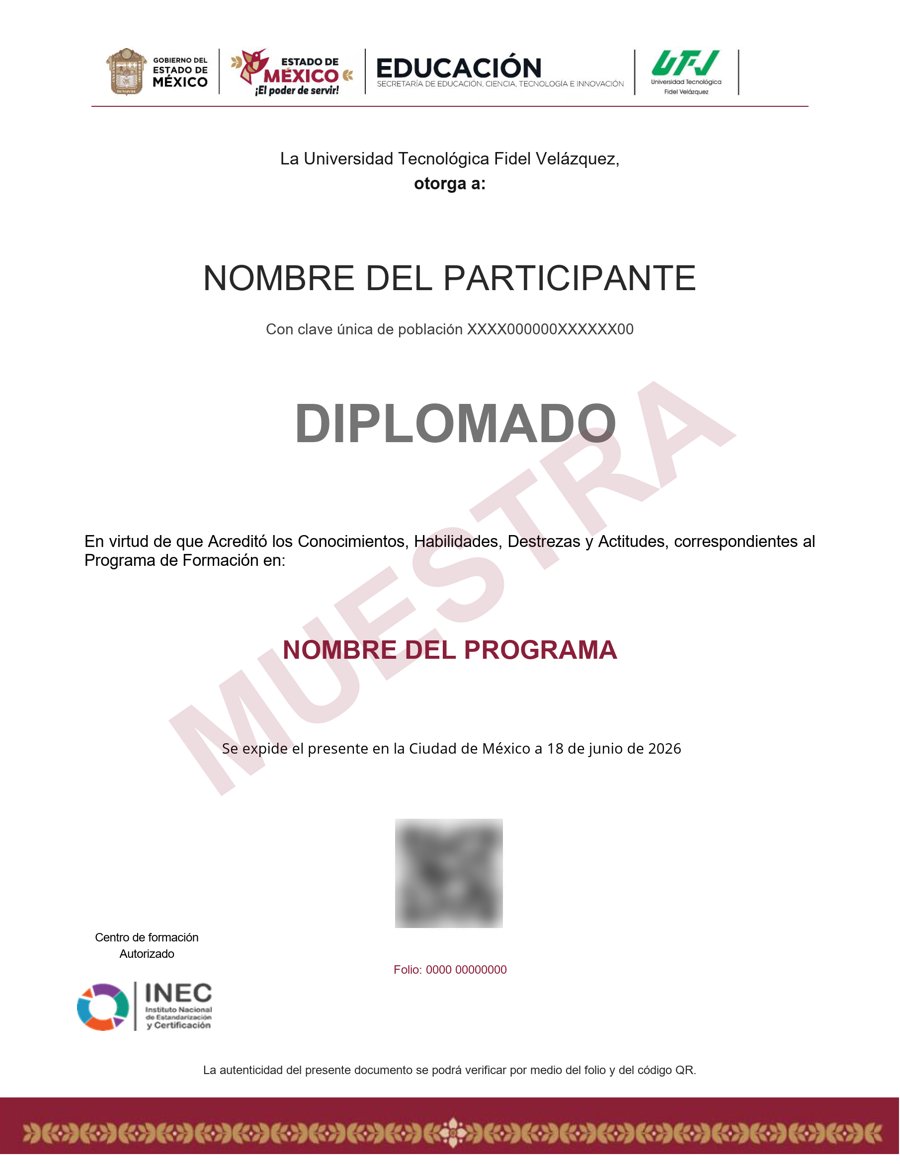
Muestra · verificable por folio y QR
- Opcional: por $900 MXN adicionales, certificado emitido por la Secretaría de Educación Pública (SEP), a través del Gobierno del Estado de México.
- Contenido impartido por Tim Buchalka's Learn Programming Academy.
- Folio y QR verificables para compartirlo con quien te contrate.
Empieza hoy, a tu ritmo
Un solo pago y acceso inmediato al curso completo durante 12 meses.
- 17 unidades · 133 lecciones · 60 h
- 12 meses de acceso
- Validez SEP opcional por $900 MXN adicionales
Sobre tu inscripción
¿Cómo es el pago?
Un solo pago de $2,800 MXN. No hay mensualidades ni cargos recurrentes.
¿Cuánto tiempo tengo acceso?
12 meses desde tu inscripción, 24/7, para avanzar a tu ritmo.
¿Quién imparte el contenido?
El curso es impartido por Tim Buchalka's Learn Programming Academy; INEC gestiona tu inscripción, evaluación y certificado.
¿Qué pasa cuando vence mi acceso?
Puedes renovar tu cuenta tú mismo desde la plataforma, sin trámites ni esperas.
¿El curso tiene validez SEP?
Es opcional: por $900 MXN adicionales obtienes un certificado emitido por la SEP a través del Gobierno del Estado de México, con folio verificable.
¿El curso tiene tutor o clases en vivo?
No. Es un curso autodidacta: estudias por tu cuenta, a tu ritmo, sin tutor ni sesiones en vivo.
¿Cómo se evalúa?
Te evalúas con actividades automáticas, sin entregas a un tutor.


